
Zapier
In this article
Find out how Evessio’s Zapier integration works, which Evessio events can trigger a Zap, and how data is sent to connected apps.
Supported Triggers
Evessio’s Zapier integration is read-only. Events in Evessio can trigger a Zap to send data to a connected app, but data can’t be sent back into Evessio.
The following triggers are available:
| Trigger Event | Description |
| New Custom product | Triggers when there is a new custom product purchased |
| New Event | Triggers when a new event is created |
| New Nomination | Triggers when there is a new awards nomination purchased |
| New or Updated Product | Triggers when a product is added to the "Basket", moved to "Saved Items" or "processed" through a transaction. |
| New or Updated Ticket | Triggers when a new ticket is registered or the ticket status is updated. |
| New Table Booking | Triggers when a new table booking is purchased in an event. |
| New Ticket | Triggers when a new ticket is purchased in an event. |
| New Transactions | Triggers when a new transaction is created in an event. |
| New User | Triggers when a new user is created in an event. |
| Transaction Updates | Triggers each time a transaction is updated after its initial "Incomplete" state. |
Integrating Zapier
(Zapier Interface)
Once you have chosen Evessio as the app and the trigger event you wish to make, you will be asked to connect an account. Click the Sign in button in the Account* section.
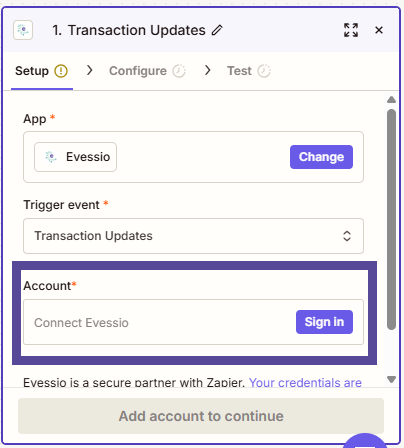
You will be asked to enter your Evessio API Token to connect.
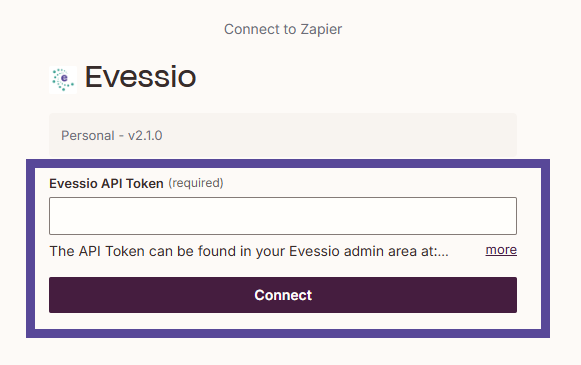
To see how to retrieve you API token, click here.
Once you have successfully connected the account you should be able to follow Zapier's Guides to achieve your desired outcome.