
Moving an event to a different event group
If an event is in the wrong event group, you can easily move it to another, existing group within your organisation.
Once you move your event to a new Event Group, the event's URL will have changed to that of the new event group, and any links previously used will not longer work.
Moving an event with Pending status
If your event is in Pending status, the transition to a new event group is very straight forward.
To get started, go to Event > Settings and click Edit.
On the left side of the Settings screen, you will find the Event Group section.
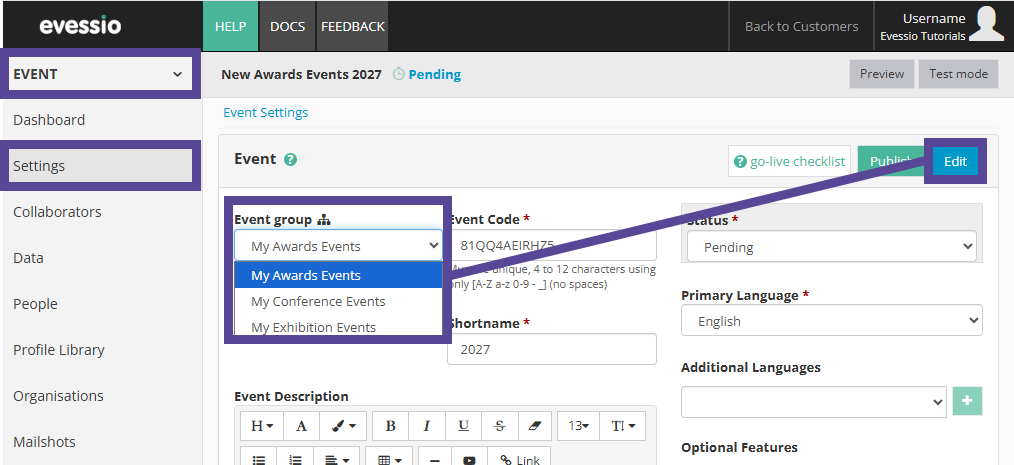
All Event Groups within your organisation will be displayed in a menu for you to choose from.
Make your preferred selection, and click Save.
Note 🗒️
If you are part of a team, you will be limited to choosing between the event groups your team has access to.
Moving an event with Published Status
If the event is already Published, you will be required to temporarily change the event status to Pending to move your event.
To do this, go to Event > Settings and click Edit.
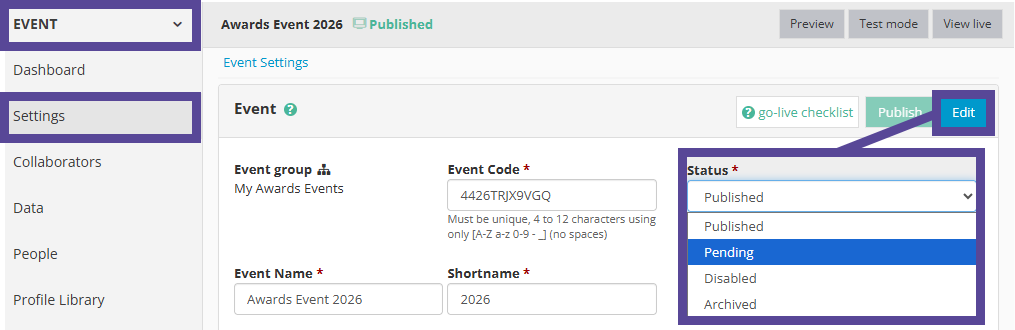
On the right side of the Settings screen, you will find the Status section.
Choose Pending from the dropdown menu, and click Save.
Then, follow the steps above to move your event to its desired Event Group.
Tip 💡
Remember to return your event to Published once you have completed this change.